
How to authenticate your API requests.
Proper AuthenticationOpen API (OAPI) access keys are used to authenticate OAPI requests only. To authenticate requests to our Booking Engine API, please follow its authentication steps here.
1. Creating Authorization Keys
Guesty's new Open API is a REST API that uses OAuth 2.0 access tokens to authenticate requests. Your access token authorizes you to use the Guesty Open API server and can be reused until it expires.
You must exchange your Client ID and Client Secret for an access token to authenticate your requests. You can create these keys by logging into your Guesty account and following these instructions.
🚧 Important
- Your Client Secret is only visible the first time you access it. After that, Guesty redacts the Client
Secret for your security. Make sure to store it in a safe place where you can access it as needed.- If you're using the old Guesty open API, please follow these instructions for migration.
2. Generating the Access Token
The following examples show you how to get your access token using cURL. Please copy the following code and modify it.
curl --location --request POST 'https://open-api.guesty.com/oauth2/token' \
--header 'Accept: application/json' \
--header 'Content-Type: application/x-www-form-urlencoded' \
--data-urlencode 'grant_type=client_credentials' \
--data-urlencode 'scope=open-api' \
--data-urlencode 'client_secret=<YOUR_CLIENT_SECRET>' \
--data-urlencode 'client_id=<YOUR_CLIENT_ID>'
var settings = {
"url": "https://open-api.guesty.com/oauth2/token",
"method": "POST",
"timeout": 0,
"headers": {
"Accept": "application/json",
"Content-Type": "application/x-www-form-urlencoded"
},
"data": {
"grant_type": "client_credentials",
"scope": "open-api",
"client_secret": "<YOUR_CLIENT_SECRET>",
"client_id": "<YOUR_CLIENT_ID>"
}
};
$.ajax(settings).done(function (response) {
console.log(response);
});const myHeaders = new Headers();
myHeaders.append("Accept", "application/json");
myHeaders.append("Content-Type", "application/x-www-form-urlencoded");
const urlencoded = new URLSearchParams();
urlencoded.append("grant_type", "client_credentials");
urlencoded.append("scope", "open-api");
urlencoded.append("client_secret", "<YOUR_CLIENT_SECRET>");
urlencoded.append("client_id", "<YOUR_CLIENT_ID>");
const requestOptions = {
method: "POST",
headers: myHeaders,
body: urlencoded,
redirect: "manual"
};
fetch("https://open-api.guesty.com/oauth2/token", requestOptions)
.then((response) => response.text())
.then((result) => console.log(result))
.catch((error) => console.error(error));var request = require('request');
var options = {
'method': 'POST',
'url': 'https://open-api.guesty.com/oauth2/token',
'headers': {
'Accept': 'application/json',
'Content-Type': 'application/x-www-form-urlencoded'
},
form: {
'grant_type': 'client_credentials',
'scope': 'open-api',
'client_secret': '<YOUR_CLIENT_SECRET>',
'client_id': '<YOUR_CLIENT_ID>'
}
};
request(options, function (error, response) {
if (error) throw new Error(error);
console.log(response.body);
});<?php
$curl = curl_init();
curl_setopt_array($curl, array(
CURLOPT_URL => 'https://open-api.guesty.com/oauth2/token',
CURLOPT_RETURNTRANSFER => true,
CURLOPT_ENCODING => '',
CURLOPT_MAXREDIRS => 10,
CURLOPT_TIMEOUT => 0,
CURLOPT_FOLLOWLOCATION => false,
CURLOPT_HTTP_VERSION => CURL_HTTP_VERSION_1_1,
CURLOPT_CUSTOMREQUEST => 'POST',
CURLOPT_POSTFIELDS => 'grant_type=client_credentials&scope=open-api&client_secret=%3CYOUR_CLIENT_SECRET%3E&client_id=%3CYOUR_CLIENT_ID%3E',
CURLOPT_HTTPHEADER => array(
'Accept: application/json',
'Content-Type: application/x-www-form-urlencoded'
),
));
$response = curl_exec($curl);
curl_close($curl);
echo $response;
import http.client

conn = http.client.HTTPSConnection("open-api.guesty.com")
payload = 'grant_type=client_credentials&scope=open-api&client_secret=%3CYOUR_CLIENT_SECRET%3E&client_id=%3CYOUR_CLIENT_ID%3E'
headers = {
  'Accept': 'application/json',
  'Content-Type': 'application/x-www-form-urlencoded'
}
conn.request("POST", "/oauth2/token", payload, headers)
res = conn.getresponse()
data = res.read()
print(data.decode("utf-8"))
Sample Response
Guesty returns an access token, the number of seconds the access token is valid (equal to 24 hours), token type, and scope. You may reuse the token as often as you need within that period.
{
    "token_type": "Bearer",
    "expires_in": 86400,
    "access_token": "eyJraWQiOiJydFFaWXhoTzBtNlllbWZaRnRBRXJORFVkWThZOFlPeGxndVZabmpJZVNvIiwiYWxnIjoiUlMyNTYifQ.eyJ2ZXIiOjEsImp0aSI6IkFULlVWdkZ5NW5ES1h4SlBvUVUzbWN3ZS1ORXp0eHo0NWNQVktZVUFxM3V5RXMiLCJpc3MiOiJodHRwczovL2xvZ2luLmd1ZXN0eS5jb20vb2F1dGgyL2F1czFwOHFyaDUzQ2NRVEk5NWQ3IiwiYXVkIjoiaHR0cHM6Ly9vcGVuLWFwaS5ndWVzdHkuY29tIiwiaWF0IjoxNjU5NTM3NjUwLCJleHAiOjE2NTk2MjQwNTAsImNpZCI6IjBvYTViaWw0MzB4OHpMeldCNWQ3Iiwic2NwIjpbIm9wZW4tYXBpIl0sInJlcXVlc3RlciI6IkVYVEVSTkFMIiwiYWNjb3VudElkIjoiNjJhMDZkMmYyMjUxMzAwMDM1OWVlODkzIiwic3ViIjoiMG9hNWJpbDQzMHg4ekx6V0I1ZDciLCJ1c2VyUm9sZXMiOlt7InJvbGVJZCI6eyJwZXJtaXNzaW9ucyI6WyJhZG1pbiJdfX1dLCJyb2xlIjoidXNlciIsImlhbSI6InYzIiwibmFtZSI6IkNTIHwgVEEtMSB8IE1vc2hlIn0.LlZZUhM4WTsIsgmuqLasl-5WtNx0N8MvpmSGerSz5DpvO2AkcOhZAuYgPh1xqocGpwcKLMBokYvSyC0xRtptDEpaEY8X__ozvDS_UpUp2vKdtU2t-1ns7ut5qZlGhf6ffZAR0K1WXEb1081n-0Ms5qxfy1HbWkmyPUt0tgN-xAmRgnbSX01YELZ-_vovpitsxC0JYPPpBOi_w8kxlxsqKLWiFzDe5SpzBUYncjJEafISXzo5PNHEweHkvguXXM9xVXlNpE_q0DfQvQ41mn8TDnhUVtspscG3WmKV86k5QAjqHyYMJ2_2WOWRWrjfeyKc5ePC1HqCANRxOO7oS7dQcA",
    "scope": "open-api"
}
You can generate a maximum of five access tokens per 24 hours, per clientId.
Best Practices
- Store the token securely in memory, a database, or a cache:
- To avoid the rate limits on the
/oauth2endpoint, we advise calling it once a day, and caching the token for 24 hours. Use this same token for any other Open API requests within that period.- Alternatively, you can also adopt a reactive approach and choose to refresh your token after it expires. You will receive a
401 - Unauthorizederror when your token has expired. You can handle the 401 error and refresh your access token accordingly.- Track the token's expiration timestamp:
- To minimize the chance of errors, store the value of the
expires_infield locally, using it to ensure your token is refreshed 30 - 60 minutes before it expires. Other useful headers include:
ratelimit-limit: Your allocated access token quota. It will be 5.ratelimit-remaining: Your remaining access token quota. E.g., 4.ratelimit-reset: The number of seconds until the token slot you've used regenerates. E.g., 74699.x-ratelimit-remaining-day: Essentially, the same asratelimit-remaining.x-ratelimit-limit-day: The same asratelimit-limit.- Automatically request a new token when it's close to expiry (e.g., within 5 minutes).
- Avoid requesting a new token on every API call to stay within the usage limit.
3. Using the Access Token
When you make a request to the Open API, include the access token in the Authorization header with the designation Bearer.
Example
curl --location --request GET 'https://open-api.guesty.com/v1/listings' \
--header 'accept: application/json' \
--header 'Authorization: Bearer eyJraWQiOiJydFFaWXhoTzBtNlllbWZaRnRBRXJORFVkWThZOFlPeGxndVZabmpJZVNvIiwiYWxnIjoiUlMyNTYifQ.eyJ2ZXIiOjEsImp0aSI6IkFULlVWdkZ5NW5ES1h4SlBvUVUzbWN3ZS1ORXp0eHo0NWNQVktZVUFxM3V5RXMiLCJpc3MiOiJodHRwczovL2xvZ2luLmd1ZXN0eS5jb20vb2F1dGgyL2F1czFwOHFyaDUzQ2NRVEk5NWQ3IiwiYXVkIjoiaHR0cHM6Ly9vcGVuLWFwaS5ndWVzdHkuY29tIiwiaWF0IjoxNjU5NTM3NjUwLCJleHAiOjE2NTk2MjQwNTAsImNpZCI6IjBvYTViaWw0MzB4OHpMeldCNWQ3Iiwic2NwIjpbIm9wZW4tYXBpIl0sInJlcXVlc3RlciI6IkVYVEVSTkFMIiwiYWNjb3VudElkIjoiNjJhMDZkMmYyMjUxMzAwMDM1OWVlODkzIiwic3ViIjoiMG9hNWJpbDQzMHg4ekx6V0I1ZDciLCJ1c2VyUm9sZXMiOlt7InJvbGVJZCI6eyJwZXJtaXNzaW9ucyI6WyJhZG1pbiJdfX1dLCJyb2xlIjoidXNlciIsImlhbSI6InYzIiwibmFtZSI6IkNTIHwgVEEtMSB8IE1vc2hlIn0.LlZZUhM4WTsIsgmuqLasl-5WtNx0N8MvpmSGerSz5DpvO2AkcOhZAuYgPh1xqocGpwcKLMBokYvSyC0xRtptDEpaEY8X__ozvDS_UpUp2vKdtU2t-1ns7ut5qZlGhf6ffZAR0K1WXEb1081n-0Ms5qxfy1HbWkmyPUt0tgN-xAmRgnbSX01YELZ-_vovpitsxC0JYPPpBOi_w8kxlxsqKLWiFzDe5SpzBUYncjJEafISXzo5PNHEweHkvguXXM9xVXlNpE_q0DfQvQ41mn8TDnhUVtspscG3WmKV86k5QAjqHyYMJ2_2WOWRWrjfeyKc5ePC1HqCANRxOO7oS7dQcA'
When your access token expires, repeat the /oauth2/token request to retrieve a new access token.
Expired TokenYou'll know your token has expired when you receive a status 403 error with the following message:
{
  "message": "You don't have permission to access, please contact Guesty support."
}
Using Postman to Generate an Access Token
Step-by-Step
In the Postman app, complete the following:
- Open a new request tab.
- Set the request method to POST.
- Enter
https://open-api.guesty.com/oauth2/tokenas the request URL.

Figure 1: Request Method and URL
- Select the Headers tab, hide the auto-generated headers, and add the following parameters (if they don't exist):
Accept:application/jsonContent-Type:application/x-www-form-urlencoded
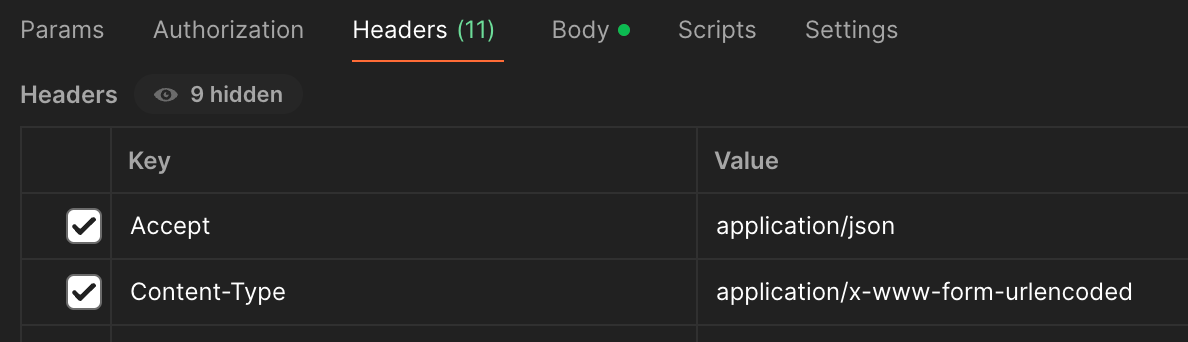
Figure 2: Request Headers
- Select the Body tab and x-www-form-urlencoded option from the dropdown menu. Then enter the following parameters:
grant_type=client_credentialsscope=open-apiclient_secret={your_client_secret}client_id={your_client_id}
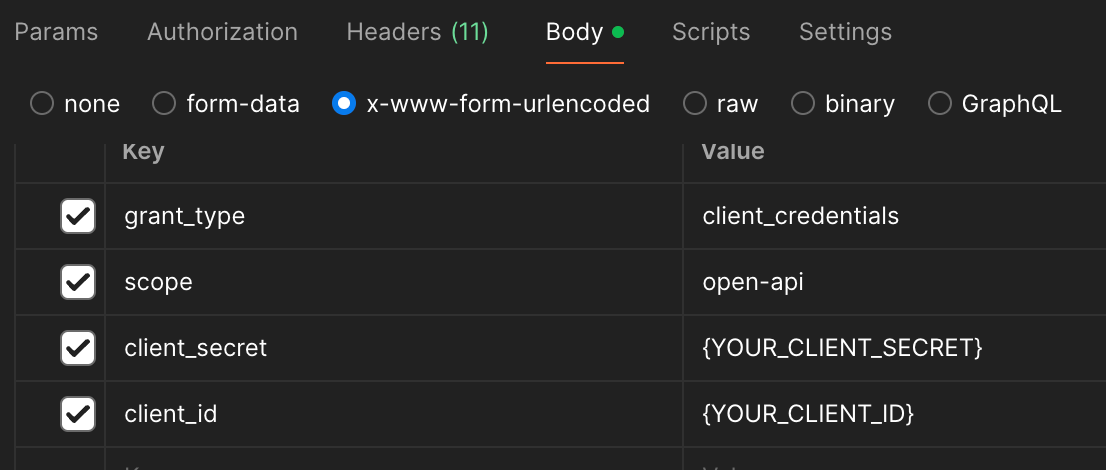
Figure 3: Request Body Parameters
- Click the Send button.
Expected Response
Status 200 OK
{
    "token_type": "Bearer",
    "expires_in": 86400,
    "access_token": "<accessToken>",
    "scope": "open-api"
}
Safeguarding AccessDo not share generated tokens with anyone outside your organization that you do not trust. Giving third parties access to Guesty's Open API can harm your account and business. Guesty is not responsible for any damage or errors in your account caused by unauthorized use of these tokens. This is especially important for third parties that change price and availability settings. To see a list of trusted third-party solutions, visit the Guesty Marketplace. If you are unsure what to do, contact your dedicated Account Manager or the Customer Experience team .
Troubleshooting Authentication Issues
If you encounter issues while authenticating with the Guesty Open API, consider the following common problems and resolutions:
Invalid Client ID or Secret
- Double-check that you're using the correct values from the Guesty dashboard.
- Ensure there are no extra spaces or formatting issues when copying and pasting.
401 Unauthorized or 403 Forbidden
- Confirm that your token is valid and not expired.
- Check that your request includes the
Authorization: Bearer YOUR_ACCESS_TOKENheader. - Verify that the token is being used for the correct account environment (e.g., sandbox/test vs production).
Token Request Limit Exceeded
- Guesty allows only 5 token requests per key in a 24-hour period.
- Implement token caching as shown in this guide to avoid unnecessary re-authentication.
Malformed JSON Request
- Make sure your JSON is correctly formatted.
- Include the
Content-Type: application/jsonheader in your request
SSL or Connection Errors
- Ensure you're using
https://in all request URLs. - Confirm your system allows outbound HTTPS connections to Guesty servers.
If problems persist, consult the Authentication Guide or contact Guesty support.