
Subscribe to webhooks
Subscribe to and handle Guesty webhook events.
What is a webhook?
A webhook lets your app receive real-time updates from other systems, so you get important information as soon as it happens. In many cases, this is more efficient than polling an API for changes.
---
config:
  layout: elk
  theme: redux-color
  look: neo
  fontFamily: '''Jetbrains Mono Variable'', monospace'
---
sequenceDiagram
    participant Client
    participant Server
    Client->>Server: Subscribe to webhook events
    Server-->>Client: Subscription confirmed
    Note over Server: Event occurs on platform
    Server->>Client: Send webhook notification
    Client-->>Server: 200 OK
    Note over Client: Validate signature
    Client->>Server: Commence data retrieval
    Note over Client,Server: Cycle complete
With Guesty's Open API, you can set up webhook subscriptions to keep your application updated as soon as something changes. Using webhooks helps you get the most value from the API.
Why subscribe to webhooks?
After you finish your initial Guesty Open API integration and data sync, subscribe to the webhook events that matter to your business. Webhooks help you stay current with account activity, save time, and sync only the data that has changed since your last update. For example, you can subscribe to a webhook for new reservations and be notified whenever a booking is created.
Table of Supported Webhooks
The following table summarizes the Webhooks Guesty offers, with links to more detailed guides for each type.
| Webhook Domain | Webhook Event |
|---|---|
| Reservation webhooks | reservation.new, reservation.updated, reservation_update-shortlist, reservation.created.v2, and reservation.updated.v2 |
| Message webhooks | reservation.messageReceived, and reservation.messageSent |
| Payment webhooks | payments.authenticationRequired, payments.authorizationHoldFailed, payments.disputes, payments.failed, payments.method.received, payments.overcharged, payments.overcharge.expected, payments.invalidPaymentMethod, payments.overdue, payments.received, and payments.refunded |
| Listing webhooks | listing.new, listing.updated, and listing.removed |
| Calendar webhooks | listing.calendar.updated, and calendar.updated.v2 |
| Task webhooks | task.created, task.updated, and task.deleted |
| Guest webhooks | guest.created, guest.updated, and guest.deleted |
| Financials webhooks | guest-folio.created and guest-folio.updated |
Interpreting and processing payloadsWebhook payloads vary in their levels of detail. Guesty is also embracing a leaner payload with newer event versions. Whenever you need more complete details, retrieve the relevant object from Guesty after receiving the webhook to compare the fresh data with your stored version.
Subscribe to events
To subscribe to webhook events, follow the steps in the reference documentation. Each webhook subscription includes:
- URL: Must be HTTPS on port 443 with a publicly resolvable hostname. For example,
https://www.hookurl.com. Keep URLs per subscription unique to avoid delivery issues. - Events: A list of
eventsthe URL is subscribed to.
Example
{
  "url": "https://www.hookurl.com",
  "events": [
    "reservation.created.v2",
    "reservation.updated.v2",
    "calendar.updated.v2"
  ]
}
Keep your subscriptions up to date by editing them or replacing them (delete then create) as needed. Avoid creating duplicate subscriptions with the same URL, since this can lead to missed notifications.
Validate webhooks
Each subscribed endpoint receives its own unique signing key that you can use to validate the events you receive from Guesty. To validate:
- Retrieve your unique webhook secret with
GET /webhooks-v2/secretor from your webhooks developer dashboard in your Guesty account - Follow Svix’s instructions on how to use your secret to validate your webhook payloads
Recreating subscriptionsDeleting and recreating a subscription for the same endpoint can generate a new secret. Make sure you update any validation processes accordingly.
Delivery behavior
Retries and auto-disable
Guesty attempts to deliver each webhook message using a retry schedule with exponential backoff. Each message is retried according to the following schedule, with each period starting after the failure of the preceding attempt:
- Immediately
- 5 seconds
- 5 minutes
- 30 minutes
- 2 hours
- 5 hours
- 10 hours
- 10 hours (in addition to the previous)
If an endpoint is removed or disabled, delivery attempts to that endpoint will also be disabled. For example, an attempt that fails three times before eventually succeeding will be delivered roughly 35 minutes and 5 seconds after the first attempt. After all the attempts are concluded, the message will be marked as Failed for this endpoint.
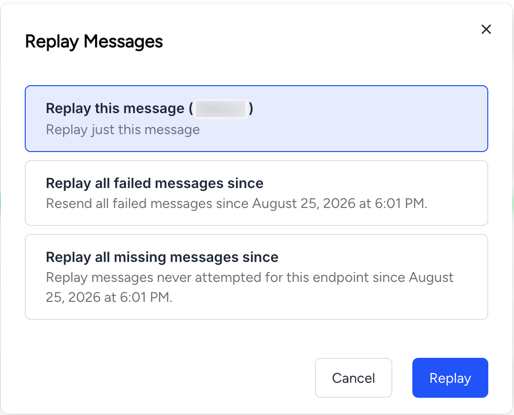
Process undelivered webhook eventsYou can manually replay failed webhook deliveries to attempt another delivery from your webhooks dashboard (Developer tools -> Webhooks).
Select the relevant URL, then navigate to the failed delivery attempt you want to replay. Click Replay to the right of the failed event, then choose whether to replay only that message or all failed messages sent at that time.

If all attempts to the specified endpoint fail for 5 days, the endpoint will be automatically disabled. The clock starts only after multiple deliveries fail within a 24-hour span, with at least a 12-hour gap between the first and last failures.
Contact Guesty API Support to request reactivation of your disabled webhook subscription.
Handle an event
- Acknowledge: To indicate that a webhook has been processed, return a
2xxstatus code (200-299) within a reasonable time frame (15s). Any other status code, including3xxredirects, is treated as a failure. - Parse: Analyze the data to identify the event type, the updated object, and the update type.
- Validate (optional): Use your secret to validate the webhook if required.
- Fetch: Invoke Guesty’s Open API to retrieve the complete details.
- Compare: Evaluate the fresh data against your cached version to identify the exact change(s).
Ordering and duplicates
Guesty processes events asynchronously, so you may receive events out of order on occasion. Recovery processes may also emit historical events you’ve already received. To ensure you process events in the correct order and ignore duplicates, monitor and process according to the following:
- Deduplicate on the
svix-idand the Guestymeta.eventId(reservation v2 events contain dedup logic, so you should only receive unique payloads from them) - Order according to the
__vorlastUpdatedAtdates contained in the data. Rely on the fresh data you ingest to drive your state, not the order of events.
Newer events like the reservation v2 ones deduplicate by design and provide a publishedAt date and a subEvent value to make this even easier.
FAQs
What is considered an error on the part of the recipient endpoint?
The nature of a webhook is that it doesn't wait for a reply from the recipient. If the recipient is unresponsive, the delivery will fail.
How long after an event will I receive the webhook?
Webhooks can be received anywhere from a few milliseconds to 30 minutes after the event occurs on your Guesty account. If you're encountering delays in excess of half an hour, please contact support.
Why am I receiving duplicate payloads?
Check your webhooks dashboard for duplicate webhook subscriptions. Use the API to tidy them up and consolidate the events as needed. You only need separate subscriptions if each is tailored for a separate system.
Updated 5 days ago